 PlugPress
What Is Saddle?
Saddle lets an AI app work on your WordPress site. You connect an app you already use, like Claude, ChatGPT or Cursor, and then you just ask for what you want.
Write a post. Build a page. Swap a photo. Fix a headline. Saddle makes the change on your real site, and everything it makes stays editable in WordPress afterwards.
You decide what it is allowed to do. When you install it, the AI can only read. Nothing is deleted without asking you first, and every change is written down so you can see what happened.
Nothing goes through anyone else’s server. Your site is the server, and the AI app connects straight to it.
What can a connected AI actually do?
Here is the sort of thing you can ask for:
| Ask for this | What it does | Needs |
|---|---|---|
| “Write a post about X” | Writes it and puts it on your site. Posts, pages, categories, tags, and it can search what is already there. | Reading & writing |
| “Build me a pricing page” | Builds a real page you can still edit by hand afterwards, using your theme’s own colours, fonts and spacing. | Reading & writing |
| “Check this page before I publish” | Goes over the page, scores it, and tells you what looks wrong, including text that is hard to read. | Just reading |
| “Find a photo for this post” | Searches Unsplash and adds one to your media library, with credit to the photographer. | Reading & writing |
| “Turn on that plugin” | Switches plugins and themes on or off, changes settings, clears the cache. | Managing the site |
| “Remember how we do things” | Keeps your instructions and notes, so the next chat already knows how your site works. | Reading & writing |
Other plugins can add their own to that list. Install Waggle and its SEO tools turn up in the same chat.
The Permissions screen in your dashboard is always the real list for your site. It shows everything that is available, and lets you switch off anything you do not want.
What can’t a connected AI do?
- Anything, at first. A new install is set to Just reading. The AI can look, and change nothing, until you say otherwise.
- Delete something in one go. Before anything is deleted or written over, it shows you what would go and waits for you to say yes. See Safe deletions.
- Run code on your server. There is no way to run PHP, shell commands or WP-CLI. Not at any level, and not as a hidden option for power users. Everything it can do is a named thing you can switch off.
- Anything you have turned off. You can switch off any single tool, and one master switch pauses the whole lot at once.
What is MCP, and why does it matter here?
You do not need to know this to use Saddle. But if you have seen the term, here is what it means.
MCP stands for Model Context Protocol. It is the agreed way for AI apps to connect to outside tools, the way a plug fits a socket. Without it you copy things back and forth by hand, or you hand the AI your admin password and hope.
With it, the AI gets a list of things it is allowed to do, and your side writes that list. That is why it suits WordPress. Your site decides what exists, what is allowed, and what gets recorded. Saddle builds this into WordPress itself, so the keys are ordinary Application Passwords that you can cancel from your profile like any other.
Which AI apps work with Saddle?
Any app that speaks MCP. Saddle writes the setup for eight of them, so you just copy one line and paste it in — all on one page, Set up Saddle MCP:
| App | Kind | Setup |
|---|---|---|
| Claude | Desktop app | One config block |
| ChatGPT | Web + desktop | OAuth sign-in |
| Claude Code | Terminal | One command |
| Codex | ChatGPT app + terminal | A pasted key |
| Cursor | Code editor | MCP settings |
| VS Code | Copilot agent mode | A project file |
| Gemini CLI | Terminal | One command |
| Anything else | Any MCP app | The standard setup |
Most apps let you paste a key. ChatGPT’s connector does not, because its screen has nowhere to put one. So Saddle can run a sign-in of its own instead, inside your site. It is off until you turn it on. See Sign-in for ChatGPT.
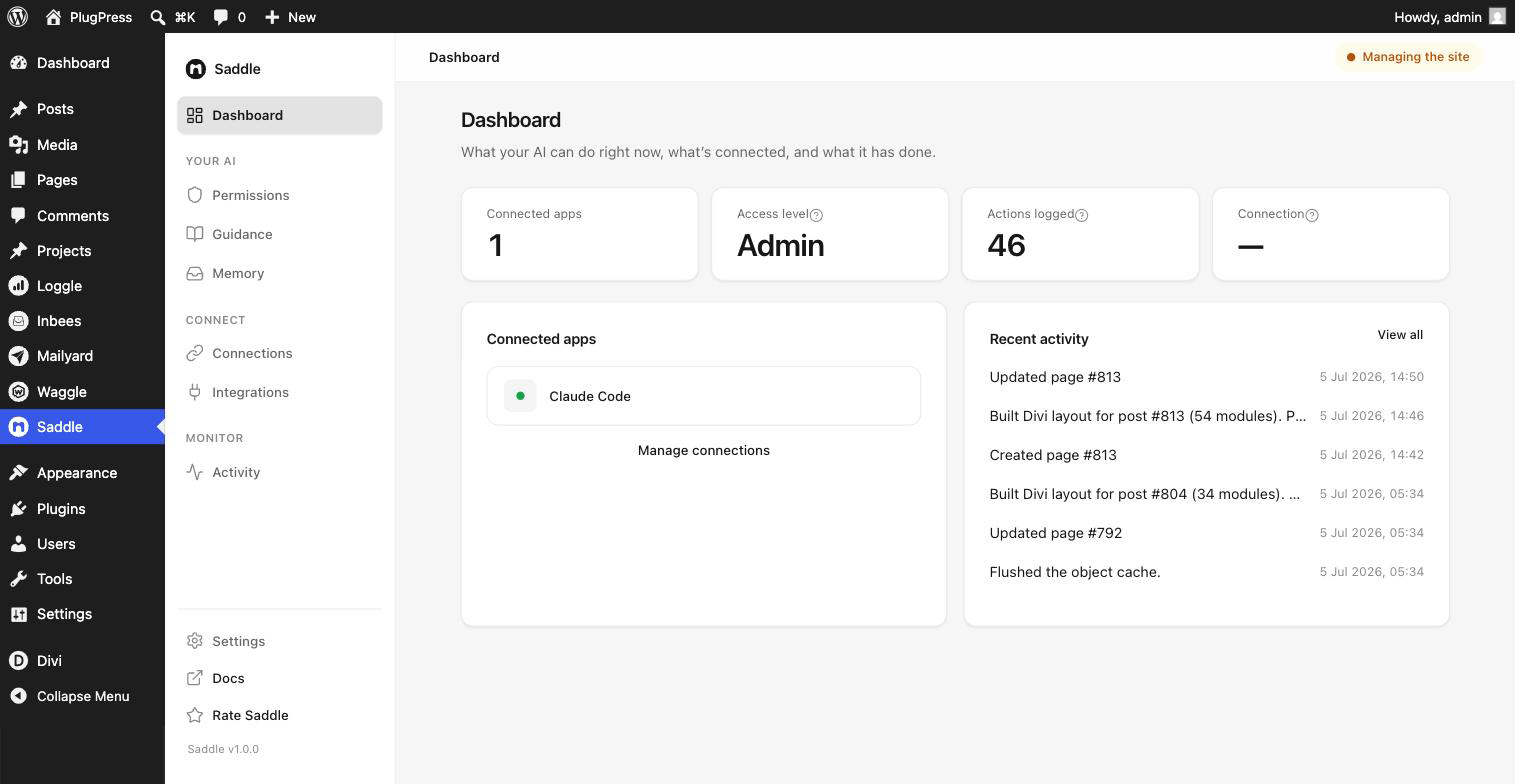
What does it look like in the dashboard?
Do I need Saddle Pro?
Only if your site is built with Divi 5. The free plugin is complete on its own. Nothing in it is locked or cut short, and it builds normal WordPress block layouts without any help. Saddle Pro teaches it Divi, so it can build real Divi pages that still open in the Visual Builder.
FAQ
Does my content go to PlugPress, or to an AI company?
Never to PlugPress. Your content does reach the AI app you connected, but that is the whole point of connecting it, and it is the same as pasting the text into a chat yourself. The difference is that you pick the app, and you can cut it off in one click.
Is this the same as giving an AI my admin login?
No, and that is the main reason to use it. An admin login hands over everything, forever, and you never see what was done with it. A Saddle connection only opens the things you allowed. It writes down every change, shows you what would go before it deletes, and can be cut off without touching your password.
Why is it called Saddle?
A saddle is what lets you ride a horse. You do not overpower the animal. You get a proper seat, and you hold the reins. That is the idea here. AI is strong and getting stronger, and this is the thing that lets you put it to work on your site without letting go of it.
Do I need to know anything technical?
No. Saddle writes the setup for you and you paste it into your app. There is nothing to edit by hand.
What does it cost?
The free plugin is free, and complete. Pro is a paid add-on, and only worth it for Divi sites.
Which WordPress version do I need?
WordPress 6.9 or later, and PHP 7.4 or later. Your site also needs to be on HTTPS, because WordPress turns off the sign-in keys Saddle uses on plain HTTP.