 PlugPress
The Loggle AI-Crawler Report
People increasingly find websites through AI assistants — but before an assistant can send you a visitor, its bots have to read your site. The AI-crawler report, added in Loggle 1.2.0, shows you that reading happening.
It answers a question the AI (referred) channel cannot: am I in the AI ecosystem at all? The channel shows humans arriving from AI tools; this report shows the machines that came first.
Where to find it
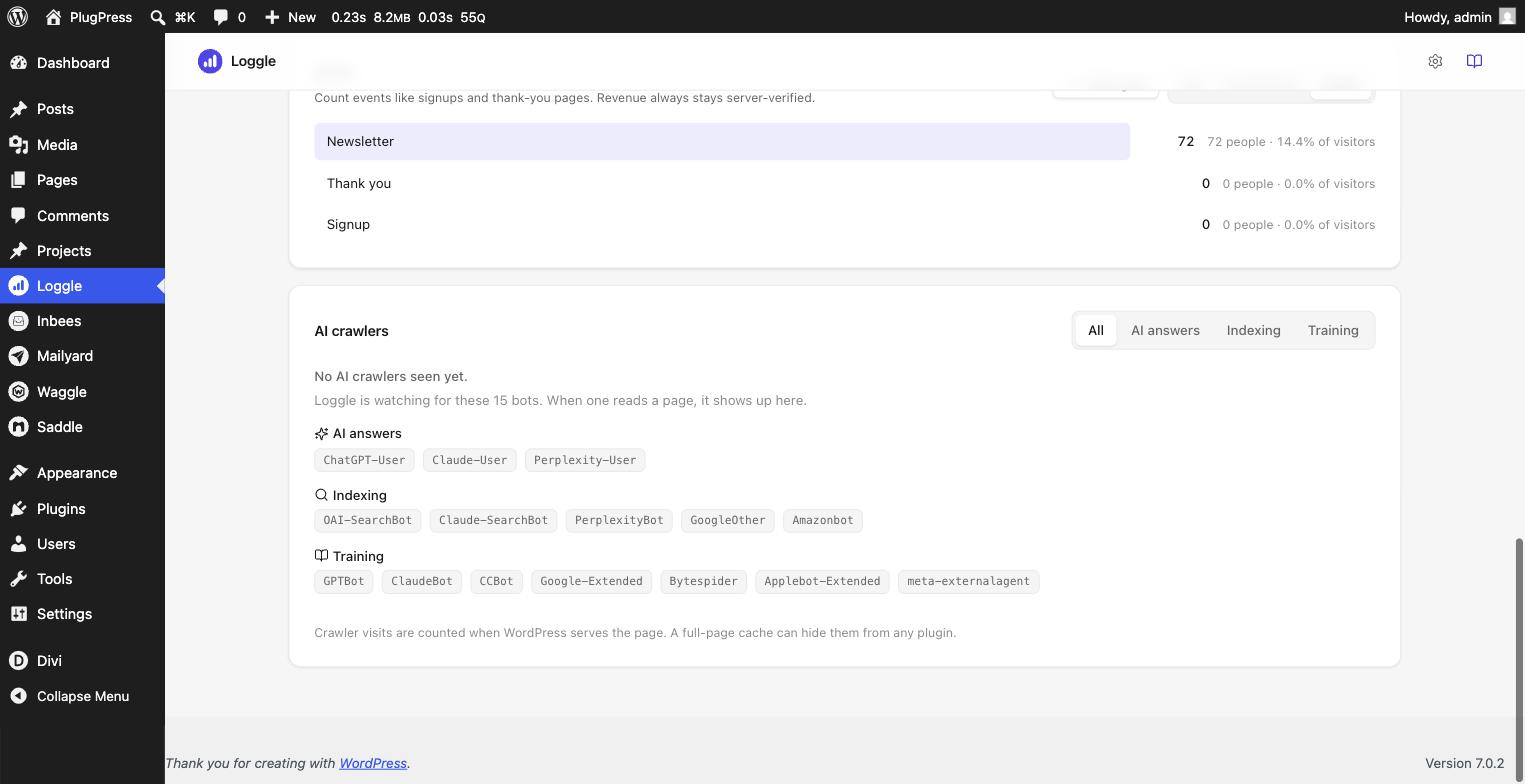
The AI crawlers panel is the last section of the Loggle dashboard, under the Visitors panel. It follows the same date range as everything else on the page. The same numbers are available from the command line with wp loggle crawlers.
Until the first bot arrives, the panel shows its watchlist — every named bot Loggle listens for, grouped by purpose — so an empty report reads as armed, not broken. Once bots are recorded, each row shows the bot, who runs it (OpenAI, Anthropic, Perplexity, Google, and the rest), and its purpose.
What the purposes mean
Every AI crawler visit is filed under why that bot exists:
- AI answers — a bot fetched your page because a real person, right then, asked an assistant something your site answers.
ChatGPT-User,Claude-User, andPerplexity-Userare this kind. These are the most valuable visits on the list: each one is a human question your content served. - Indexing — bots building the search indexes behind AI answers, such as
OAI-SearchBot,Claude-SearchBot,PerplexityBot, andAmazonbot. Being indexed is how you become citable. - Training — bots collecting text to train future models:
GPTBot,ClaudeBot,CCBot,Google-Extended,Bytespider, and others. High training traffic means the model builders consider your content worth learning from.
Use the tabs on the panel to look at one purpose at a time. A purpose with no visits yet shows just its own slice of the watchlist.
What about ordinary bots?
Loggle also recognises the everyday non-AI crawlers — search-engine spiders, link-preview fetchers, uptime monitors, and command-line scripts. Those are filtered out of your visitor numbers so they never inflate your traffic, but they are not shown in this panel: it lists AI crawlers only, so nothing here is padded with things that have nothing to do with AI.
If you want to see them, wp loggle crawlers lists every bot it matched, with a purpose column marking the ordinary ones as “Other”.
How the counting works
AI crawlers read your HTML but do not run JavaScript, so a normal analytics script never sees them. Loggle counts them differently: on the server, at the moment WordPress serves the page. No tracking script is involved, which is exactly why the numbers exist at all.
Each bot gets one tally per day. Crawler counts are kept for 90 days, like page views — and they are never mixed into your visitor numbers, which remain humans only.
The honest limits
- Full-page caching hides crawlers. If a caching plugin or your host serves a page without running WordPress, no plugin can count that request — only your server logs see it. Treat the report as a floor, not a census. The panel says this too.
- A crawler visit is a page fetch, not a citation. The report proves you are being read; whether an assistant then cites you is not observable from your server.
- Bots that fake a browser user-agent are not counted. Honest bots identify themselves; dishonest ones are indistinguishable from visitors by design.
Reading it alongside the AI channel
The pairing is the point:
- Crawlers high, AI (referred) low — you are being read but not yet clicked. Often a matter of time, or of content that answers questions without leaving anything to click through for.
- AI answers activity climbing — people are asking assistants questions your pages answer right now. Watch the AI (referred) row in the Sources card above; the humans tend to follow.
- Everything at zero — check the caching limit above before concluding the bots have not found you.
Checking it from the command line
wp loggle crawlers prints the same window with per-purpose totals, plus the ordinary bots the panel leaves out — and when nothing is recorded yet, the same watchlist the panel shows. Add --range=7d or an exact window with --from and --to.
You can also prove the counter works in one line — fetch your own front page the way a crawler would:
curl -A "GPTBot" https://your-site.example/
Run wp loggle crawlers again and the GPTBot row will have incremented.
Blocking crawlers
Loggle observes crawlers; it does not manage them. If you want to refuse training bots, do that in your robots.txt — the named bots above respect it. The report then shows you whether they actually stopped.
Next steps
See where the resulting human traffic lands in Understanding the Loggle Dashboard, and what it earns in Reports, Visitors, and Comparisons. Questions about how AI traffic is detected are in the FAQ.