 PlugPress
OAuth Sign-In: How It Works and Why It’s Off by Default
Saddle contains a complete OAuth 2.1 authorization server — running inside your own WordPress install. It exists for one reason: some AI apps cannot send a custom sign-in header, and ChatGPT is the notable one. Its connector screen offers “no authentication”, an API key, or OAuth, and none of those carries the credential Saddle normally issues.
If you only want the setup steps, use Connect ChatGPT to WordPress. This page is about what’s actually happening underneath, and why it’s built the way it is.
Why is it off by default?
Because turning it on publishes discovery documents that tell the internet how to begin a sign-in with your site. That’s not dangerous on its own — beginning a sign-in gets an app precisely nothing — but a feature most people don’t need shouldn’t be running for everyone.
The default has to be the safe one. If you never connect ChatGPT, your site never advertises anything, and every other app keeps working through the ordinary key-based path.
What happens when an app connects?
- Discovery. The app reads your site’s published metadata to find the sign-in endpoints. Saddle serves the same documents at several addresses — the standard host-root forms, forms carrying the connector’s own path (what ChatGPT actually probes first), and copies under the connector address itself so subfolder installs work too.
- Registration. The app registers itself, if you’ve allowed that. It now has an identity — and no access whatsoever.
- Consent. You are sent to a screen inside your own wp-admin showing what’s being asked for. Nothing is granted until you approve it here. This step cannot be automated or skipped.
- Tokens. The app receives a short-lived access token and a refresh token, scoped to exactly what you approved.
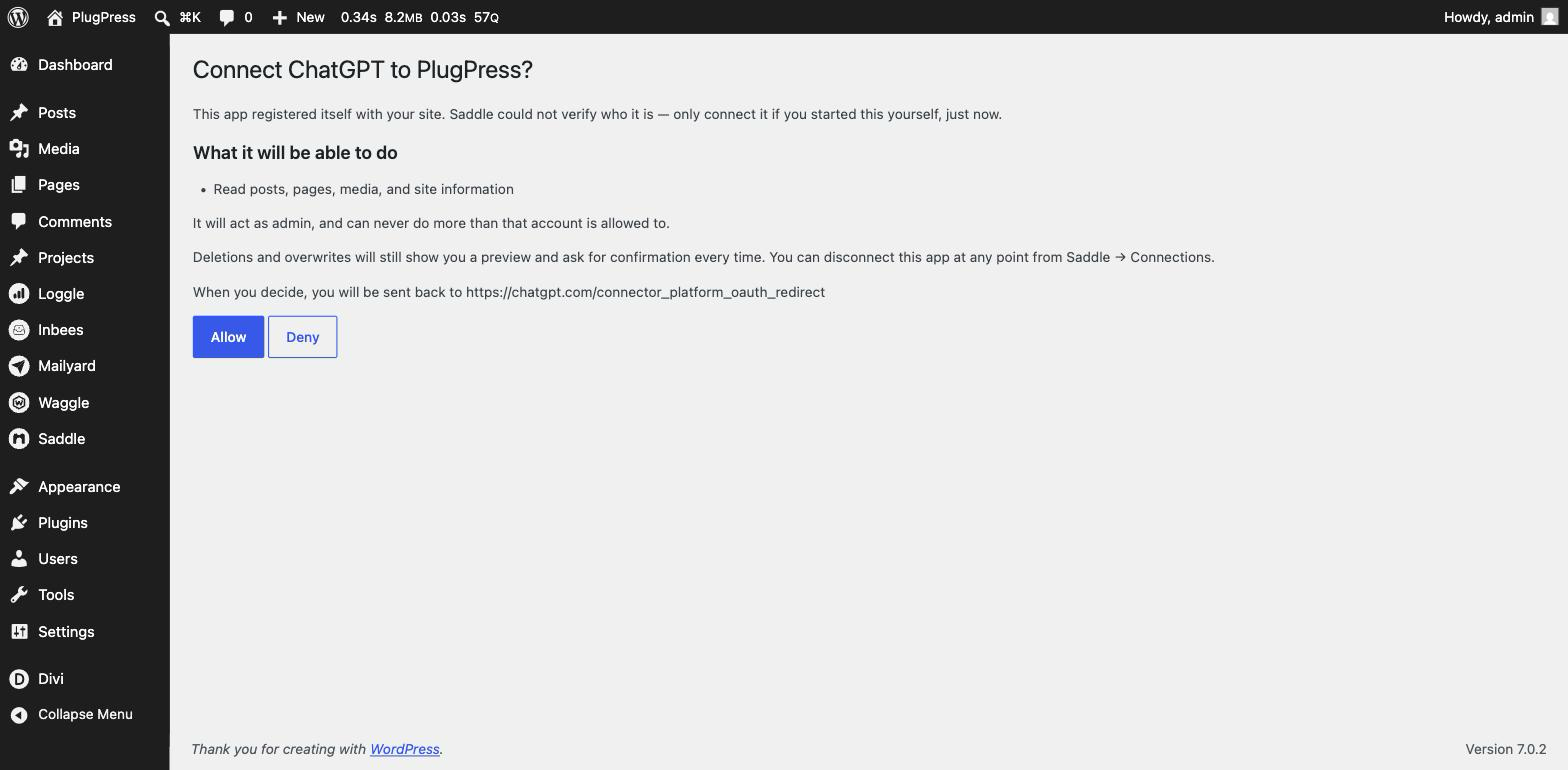
Every step happens on your domain. There is no PlugPress server anywhere in this flow — the same rule as the rest of Saddle.
Steps 1 and 2 are on a clock. A connecting app waits only a few seconds for each fetch, and treats a site that answers too late exactly as it treats one with nothing published — it reports that your site doesn’t support signing in. This is the most common reason a technically correct setup still won’t connect; see Discoverable below.
What is the scope clamp?
The single most important property: a granted scope can only ever lower access, never raise it.
What an OAuth app can do is the lesser of your site’s access level and the scope you approved. Approve an app for reading on a site set to Managing the site, and it stays read-only. Approve an app for writing on a site set to Just reading, and it still can’t write anything.
Lowering your site’s level immediately constrains every connected app, with nothing to revoke or re-issue.
What does it refuse to do?
These aren’t configurable, and that’s deliberate:
| Constraint | What it prevents |
|---|---|
| PKCE, S256 only | An intercepted authorization code is useless without the original verifier. The weaker plain method is refused outright. |
| Exact redirect-URI matching | Codes can’t be redirected to a lookalike URL. Prefix matching — the classic source of OAuth redirect attacks — is never used. |
| Refresh rotation with reuse detection | Each refresh issues a new token and retires the old one. A retired token being presented means it leaked, and the grant is killed. |
| Authorization-code replay revokes the grant | A code used twice doesn’t just fail — the whole grant is torn down, because a replay means someone else has it. |
| Registration grants nothing | Self-registration creates an identity, not access. An administrator must complete the consent screen. |
The three settings
All under Saddle → Settings → Sign-in for ChatGPT — and the connect wizard offers the same switch with one click when you pick ChatGPT, so you never have to visit Settings first. The last two only appear once it’s on:
- Discoverable — a status, not a switch. It tells you whether apps can actually find your sign-in details, and it has three answers:
- Yes — nothing to do.
- Too slow — the details are correct and in the right place, but your site takes longer to hand them over than a connecting app will wait. The app gives up and reports that your site doesn’t support signing in, which sends most people looking for a configuration problem that isn’t there. Turn on page caching, or move to a faster host; a site that needs five or more seconds to return a page will struggle regardless of Saddle.
- Maybe not — rarely fatal any more, since Saddle also serves the same documents at addresses under the connector URL itself (which work on subfolder installs), and every rejected request carries a pointer to a dot-free copy. What can still break it is a host that blocks any address beginning with a dot (
/.well-known/) — ask your host to allow those URLs — or a page cache still serving the “not found” pages from before you turned sign-in on; purge it.
- Let apps register themselves — required by ChatGPT, since it has no way for you to pre-register it. Remember that registering grants nothing.
- Check app identity — verifies an app’s published identity document rather than trusting what it claims about itself. Leave it on unless a client you trust fails because of it.
The whole card is disabled unless your site has HTTPS and pretty permalinks — the card tells you which is missing.
Managing connected apps
Apps that signed in this way appear in Saddle → Connections under Signed in themselves, separately from key-based connections, with a badge showing whether their identity was verified. Disconnect ends one; turning the sign-in service off in Settings ends all of them at once.
FAQ
Is turning this on risky?
It publishes sign-in details, not access. Nothing can be granted without you approving it on a screen inside your own dashboard, and what you grant is capped by your site’s access level.
Should I use OAuth instead of keys generally?
No. Keys are simpler, need no consent round-trip, and work with the sign-in service off — which is the default. Use OAuth for apps that can’t send a header.
ChatGPT still won’t finish connecting. Is there a way round it?
Yes, and it’s often the better answer. Codex — part of the same ChatGPT desktop app since July 2026 — reads a settings file on your own computer and accepts an ordinary pasted key, so it never performs discovery at all. None of the things on this page can block it: no sign-in service to turn on, no timing window to miss, and it reaches sites that aren’t publicly available. See Connect ChatGPT to WordPress.
Can other apps use it, or only ChatGPT?
Any OAuth-capable MCP client. It’s named for ChatGPT because that’s the case that forced it to exist.
Are the tokens WordPress Application Passwords?
No — those are the key-based path. OAuth issues its own short-lived access tokens and rotating refresh tokens, which is why they’re listed separately.
What if I turn it off with apps connected?
They stop working immediately. Key-based connections are unaffected.
Key sources
- RFC 8414 — OAuth 2.0 Authorization Server Metadata
- RFC 9728 — OAuth 2.0 Protected Resource Metadata
- Model Context Protocol — authorization