 PlugPress
What Is Loggle for WordPress?
Most analytics plugins tell you how many people visited your site. Loggle answers a harder and more useful question: which channels made you money.
It connects the visit that brought someone to your site with the payment they made later — even if that payment happens weeks after the first visit.
What Loggle does
- Tracks where visitors come from — search engines, social networks, ads, email, other websites, and AI assistants.
- Records real revenue from WooCommerce orders and Freemius payments, in exact amounts.
- Joins the two together so every channel shows the money it earned, not just the clicks it sent.
- Shows every visitor’s journey — the pages they read, the visits they made, and where the ones who never bought stopped.
- Counts the wins that aren’t money — signups, thank-you pages — as custom goals, built with zero code.
- Shows the AI bots reading your site — and whether they are answering questions, indexing, or gathering training data.
- Keeps all data in your own database. Nothing is sent to an outside service.
The AI channel
More and more people find websites by asking ChatGPT, Claude, Perplexity, or Google’s AI answers. Most analytics tools file that traffic under “Direct” or “Referral”, so it disappears.
Loggle has a dedicated channel called AI (referred). When someone clicks through from an AI assistant, Loggle records it as AI traffic and keeps the real source name, such as chatgpt.com.
And before those humans arrive, the AI companies’ bots come to read you. The AI-crawler report shows which bots visited and why, so you can see yourself entering the AI ecosystem before the first referred visitor lands.
An honest limit: some AI tools send visitors without any referrer information at all. Those visits arrive looking like direct traffic, and no analytics tool can identify them. Loggle reports what it can prove and does not guess.
Why attribution matters
Imagine someone reads your blog post after finding it through ChatGPT. They do not buy that day. Three weeks later they come back directly and place a £200 order.
- Most tools credit that sale to Direct, because that was the last visit.
- Loggle can credit it to AI (referred), because that was the visit that found you.
That difference decides where you spend your next hour of marketing. Loggle stores both the first and the last visit, and you choose which one gets the credit.
How Loggle identifies visitors
Loggle sets a first-party cookie in your visitor’s browser that lasts 365 days. The cookie holds a random string of characters and nothing else.
- No IP addresses are stored.
- No browser fingerprinting is used.
- No personal details are collected.
A random number in a first-party cookie is less identifying than the hashed-IP method some “cookieless” tools use. It is also what makes long-window attribution possible: a tool that forgets visitors after 24 hours cannot connect a visit today to a sale next month.
There is more detail on privacy, cookies, and data storage in the Loggle FAQ.
What you get in the dashboard
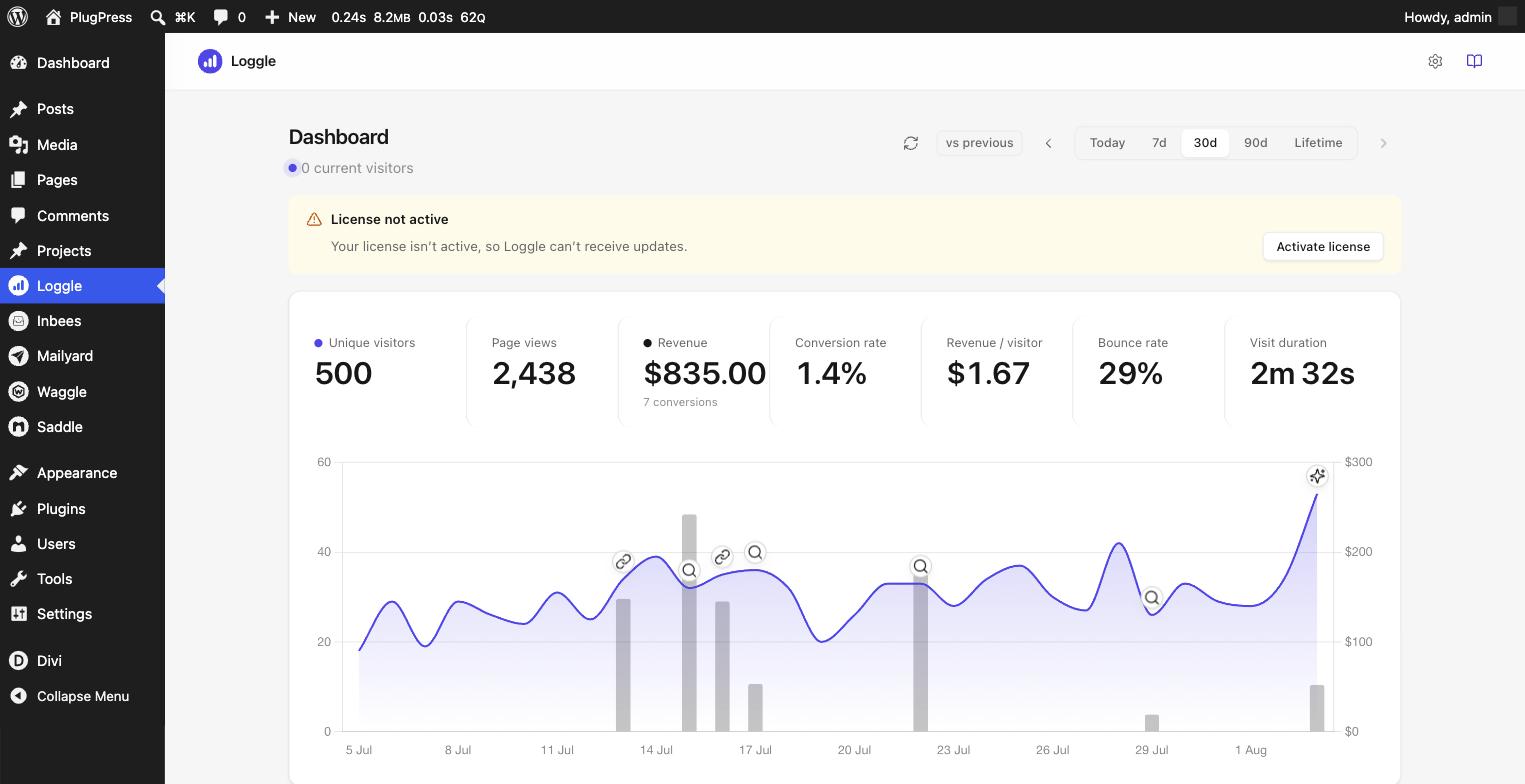
- One page with everything on it — headline numbers, the chart, breakdowns, visitors, and crawlers, top to bottom.
- Seven headline numbers — visitors, page views, revenue, conversion rate, revenue per visitor, bounce rate, and visit duration.
- A traffic and revenue chart with a marker on every sale, showing which channel earned it — click one to see that buyer’s whole story.
- Breakdowns by source, location, page, and technology, each opening into a full sortable report.
- Visitors — every visitor’s full journey, with a Customers view for the ones who paid and a Goals tab showing which channel drives each goal.
- The AI-crawler report — which AI bots read your site, and why.
- A live widget on your main WordPress dashboard showing who is on your site right now.
Who Loggle is for
- WooCommerce store owners who want to know which channels bring buyers, not just browsers.
- Plugin and theme sellers using Freemius who want their marketing tied to real licence sales.
- Content publishers who want to see whether AI assistants are sending them useful traffic.
- Anyone who wants analytics that stay on their own server.
What Loggle is not
Loggle is deliberately narrow. It does not do heatmaps, session recordings, A/B testing, or visitor chat. It does one job well, which keeps it small, fast, and simple to understand.
Next steps
Check that your site meets the system requirements, then follow the installation guide to get started. Once it is running, learn to read your numbers in Understanding the Loggle Dashboard.