 PlugPress
Troubleshooting: LLMs.txt, Markdown & AI bot tracking
A field guide to the issues most likely to come up with Waggle's llms.txt, Markdown
versions, and AI bot analytics — what causes each, how to confirm it, and how to fix it.
1. llms.txt shows the wrong domain (e.g. staging URLs)
Symptom. Your llms.txt lists URLs for a different host than your live site —
most often a staging domain like stage.example.com — even though the rest of the
site (canonical tags, sitemap) uses the correct domain. Clicking Force rebuild in
Waggle doesn't change it.
Why this happens. Waggle serves /llms.txt dynamically: every URL in it is built
live from WordPress's own home_url() at render time. So if your sitemap and canonical
tags are correct, Waggle is generating the right URLs. When /llms.txt still shows
the wrong domain, something is being served in front of Waggle, and WordPress never
runs for that request. Two things cause this:
-
A physical
llms.txtfile in your web root. On most hosts (nginx, and Apache
with static-file precedence) the web server serves an existing file straight from
disk before PHP/WordPress ever loads. If a file was created there once — by an
export tool, an old plugin, or a migration — it "shadows" Waggle's dynamic version
permanently. This is the usual culprit when Force rebuild has no effect and a
cache-busting query string (/llms.txt?x=123) still returns the old file. -
An edge or page cache (Cloudflare, or a host cache like SpinupWP/Nginx
FastCGI) holding an old copy of the response — often one generated while the site
was still on its staging domain.
How to confirm which one — read the response headers. This is the fastest and most
reliable test. From a terminal:
curl -sI https://example.com/llms.txt
Compare against how Waggle serves the file. When Waggle renders /llms.txt it sends
Content-Type: text/plain; charset=UTF-8 and, being dynamic PHP, sends no
Last-Modified or ETag. So:
Content-Type: text/plainwith nocharset, plus aLast-Modifieddate and an
ETag→ it's a static file on disk (cause #1). The web server (nginx) is
serving a real file and Waggle never runs. TheLast-Modifieddate tells you when
that file was created — often the giveaway that it predates your migration. Nginx's
ETageven encodes the file:W/"<mtime-hex>-<size-hex>".cf-cache-status: HIT, or a host cache header likex-cache: HIT→ it's an
edge/page cache (cause #2). Notecf-cache-status: DYNAMICmeans Cloudflare is
not caching it and is passing straight to origin — so if you also see the static
Last-Modified/ETagabove, the problem is the file on disk, and clearing
Cloudflare or the host cache will do nothing.
Worked example (a real diagnosis): the response came back content-type: text/plain
(no charset), last-modified: Mon, 16 Mar 2026 21:12:04 GMT, etag: W/"69b87224-d59",
cf-cache-status: DYNAMIC. That's unambiguous — a 3417-byte static file
(0xd59 = 3417) last written on March 16, served by nginx, with Cloudflare passing
through. Force rebuild and every cache purge were no-ops because none of them touch a
file on disk.
Fix.
-
Static file: remove the physical file from your web root over SSH/SFTP — the WP
admin can't do this. On a SpinupWP + DigitalOcean host the web root is typically
~/<site-name>/files(confirm the exact path in SpinupWP → your site → Web Root):cd ~/example.com/files # your actual web root ls -la llms.txt # confirm it's there mv llms.txt llms.txt.bak # rename (safer than delete — keeps a backup) curl -sI https://example.com/llms.txtSuccess looks like the response flipping to
content-type: text/plain; charset=UTF-8
with nolast-modified/etag— that's Waggle serving it live, with correct URLs.
While you're there, check for the same shadow on siblings:ls -la robots.txt sitemap.xml. -
Edge/page cache: purge the
/llms.txtURL from your host's cache, and from
Cloudflare if it's in front of your site.
The deeper cause on migrations. If your site was recently moved from a staging
domain, the fix above resolves the served file. If URLs are still wrong after
clearing any shadowing file/cache, confirm WordPress itself has the right address at
Settings → General → WordPress Address / Site Address, and that a migration
search-replace updated home/siteurl in the database.
2. llms.txt (or .md) looks garbled — â€" instead of —
Symptom. Dashes and apostrophes show as â€", ’, é, etc. — for example
Diviâ€"make instead of Divi—make.
Almost always a viewer problem, not a file problem. Waggle serves these files as
UTF-8 (Content-Type: text/plain; charset=UTF-8). The â€" pattern is the classic
signature of a UTF-8 file being decoded as Windows-1252 by whatever opened it — a
terminal, a text editor, or a copy-paste into an app with the wrong encoding. The
bytes on the server are correct.
How to verify the file is fine.
curl -s https://example.com/llms.txt | grep -m1 —
If that finds a real em-dash, the file is correct UTF-8 and the garbling is in your
viewer. Open it in a UTF-8-aware tool (or view it in a browser) and it will read
correctly.
When it is real. If the garbling appears in a browser too — and on your normal
site pages, not just llms.txt — then the source content in the database is
double-encoded, usually from a migration where a UTF-8 dump was imported over a
latin1 connection. That's a site-wide data issue to fix at the database level (a
proper UTF-8 re-import or a targeted search-replace), independent of Waggle.
3. robots.txt (or sitemap.xml) appears in "Most Crawled Pages"
Symptom. The Most Crawled Pages widget on the Bot traffic screen is topped by
/robots.txt with a very high hit count, pushing your real content pages down.
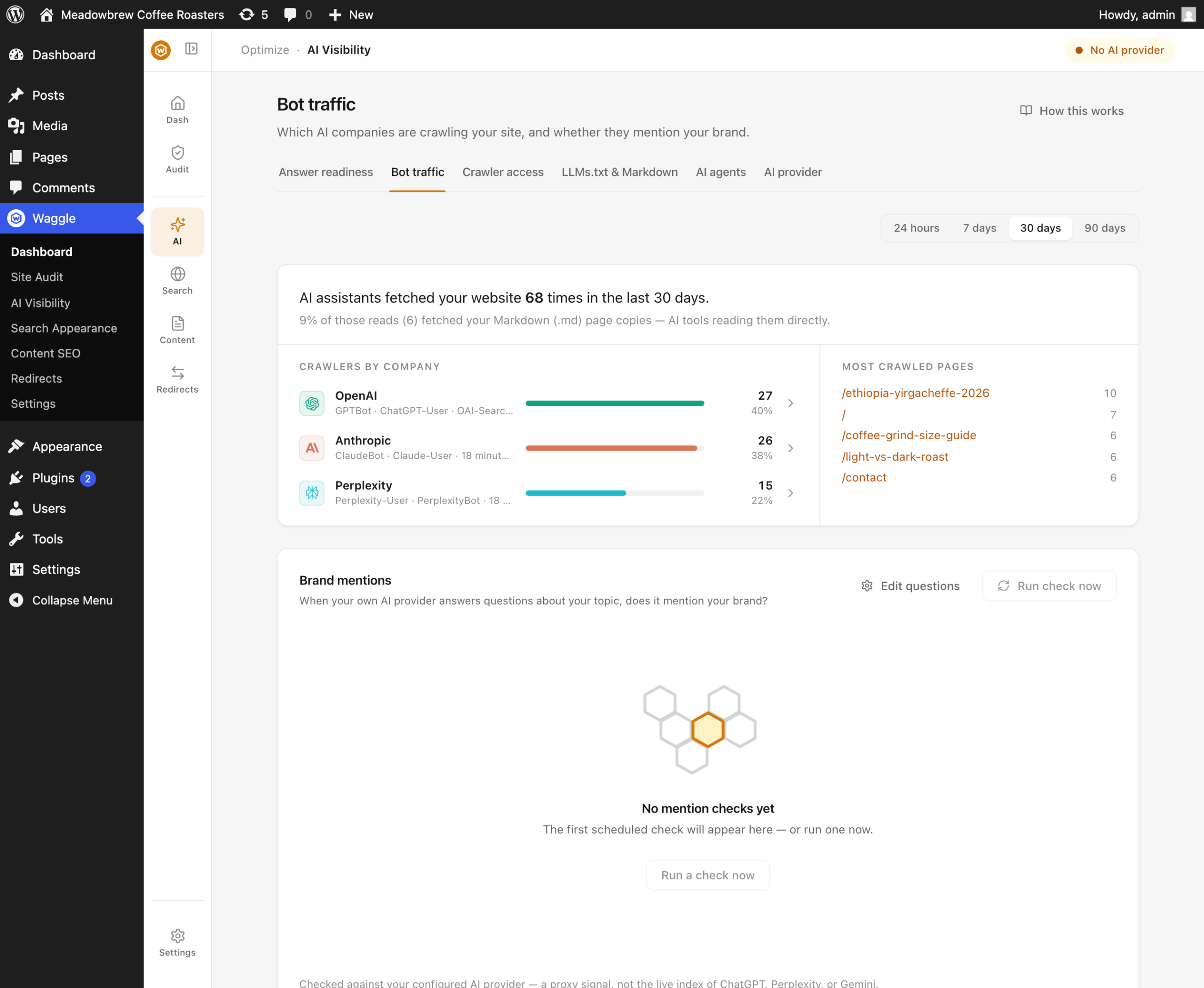
Why. Well-behaved crawlers fetch /robots.txt first on every crawl session, so it
naturally accumulates more hits than any single content page. But it's a control
file, not a page anyone reads — its hit count tells you nothing about which content
AI engines are actually consuming, which is the whole point of the widget.
What Waggle does. Machine and control files — robots.txt, sitemap*.xml,
llms.txt, favicon.ico, and feeds (/feed/) — are excluded from Most Crawled
Pages so the list reflects real content only. A high robots.txt fetch count is
expected baseline crawler behavior and isn't a signal worth surfacing on its own.
4. The same page shows twice — with and without a trailing slash
Symptom. Two rows for what is really one page, e.g. /features/dual-button and
/features/dual-button/, each with its own hit count.
Why. Bots request the same page both ways, and the raw request path is what gets
recorded, so the two variants count separately and split the page's real traffic.
What Waggle does. Recorded paths are normalized (the trailing slash is collapsed,
except for the site root /) so both variants aggregate into one row. Rows recorded
before this shipped are merged automatically the first time the updated plugin loads —
their hit counts combine, so no traffic is lost.