 PlugPress
Guidance and Skills: Teaching Your AI How You Work
Permissions decide what your AI is allowed to do. Guidance decides how it does it. The Saddle → Guidance screen holds two things: standing instructions that go to every session, and Skills — installable playbooks that teach an assistant a whole workflow.
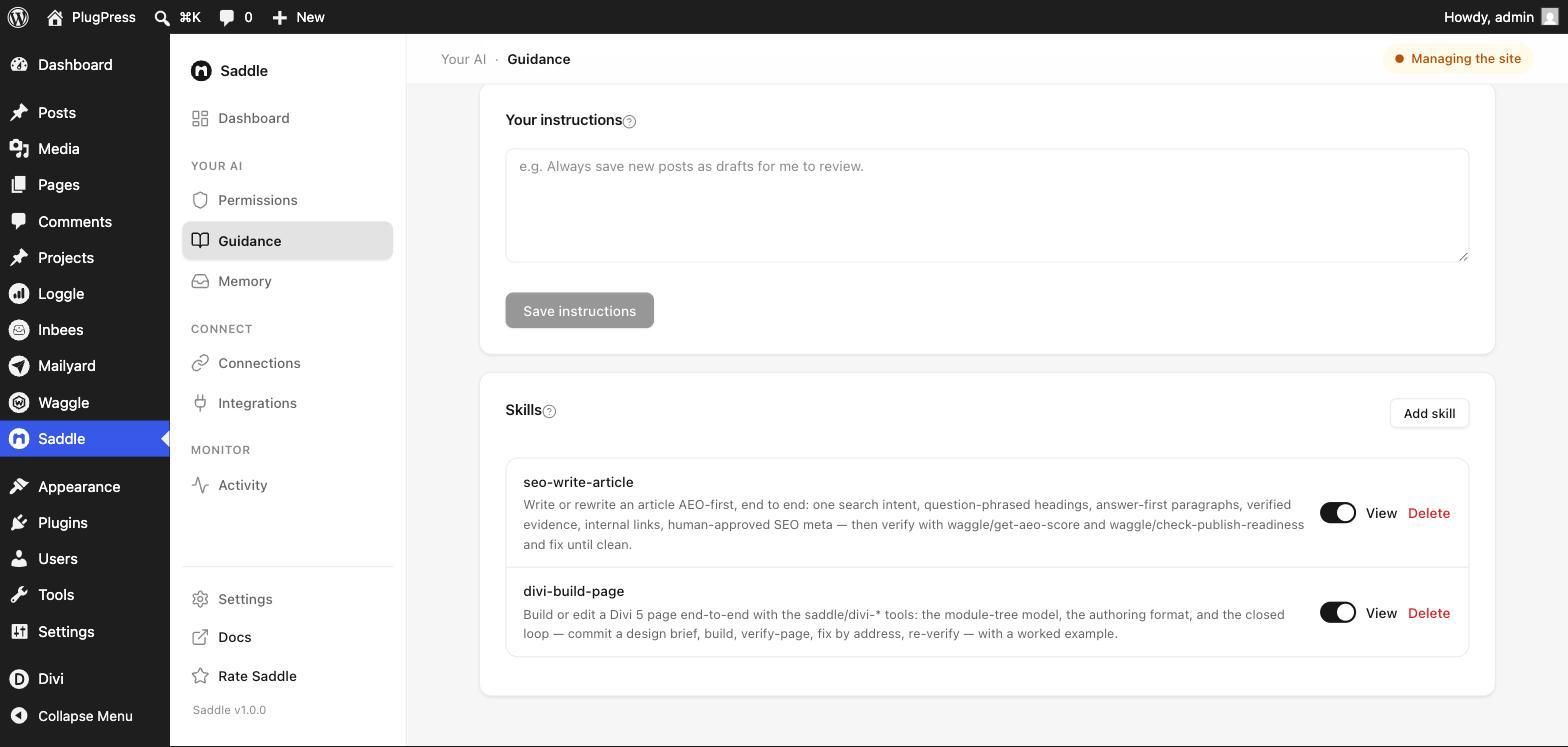
What are standing instructions?
A plain-language note that every connected assistant reads at the start of every session. Use it for the rules you’d otherwise repeat in every conversation:
- “Always save new posts as drafts for me to review.”
- “Our brand voice is direct and unfussy. No exclamation marks.”
- “Never touch anything in the Legal category.”
- “Use British spelling.”
Write it, click Save instructions, done. It applies to every app you’ve connected, not one at a time.
Instructions are guidance, not enforcement. If a rule really matters — “never delete anything” — set it in Permissions as well, where it’s enforced rather than requested.
What is a Skill?
A Skill is a Markdown file describing a workflow, installed on your site, that connected assistants discover and follow automatically when a task matches it.
Where an instruction is a rule, a Skill is a procedure. A publishing Skill might specify: research the search intent first, use question-phrased headings, answer in the first paragraph, add internal links, generate the SEO meta, run the readiness check, and only then publish. When you ask for an article, the assistant follows that — instead of whatever it would have done by default.
How do I install a Skill?
- Write or download a
.mdfile with a frontmatter block at the top. - On Saddle → Guidance, click Add skill and choose the file.
- It appears in the list with a switch, a View link, and Delete.
The frontmatter needs a name and a description; when_to_use is optional but helps the assistant judge when the Skill applies:
---
name: write-blog-post
description: Our house process for writing and publishing a blog post.
when_to_use: When asked to write, draft, or publish an article.
---

1. Check what we've already published on the topic.
2. Draft with question-phrased H2s and an answer-first opening.
3. Link to at least two related posts.
4. Save as a draft and tell me the URL — never publish directly.
Installing a Skill with an existing name replaces that one, so updating is just re-uploading.
Why can only I install Skills?
Because a Skill is text an AI will follow. If an assistant could write its own Skills, it could write its own instructions — and anything that can quietly rewrite its own rules is a problem, not a feature.
So the split is deliberate: agents read Skills, owners install them. There is no tool that creates or edits one. Uploading requires a WordPress administrator.
A Skill also never grants capability. It can only orchestrate tools that are already switched on at your access level. A Skill that says “delete the old drafts” still hits the approval gate, and still fails outright if the delete tools are off.
How does the AI know which Skill to use?
Every session receives a short index — each Skill’s name, description, and when-to-use line. That’s small enough to send every time. When a task matches one, the assistant fetches the full text on demand.
Practically: keep the description specific. “Our house process for writing and publishing a blog post” gets matched. “Content stuff” doesn’t.
Limits
| Limit | Value |
|---|---|
| Skills per site | 50 |
| Length of one Skill | 30,000 characters |
| File format | Markdown (.md) with frontmatter |
| Who can install | Administrators only |
Skill bodies are stored exactly as you wrote them — installing only removes invisible control characters, nothing else. Placeholders in angle brackets, like <id> or <page-url>, are part of your instructions and reach the assistant verbatim, so use them freely.
FAQ
What’s the difference between instructions and Skills?
Instructions are short, always-on rules that apply to everything. Skills are longer procedures loaded only when relevant. Rule of thumb: if it applies to every task, it’s an instruction; if it’s “how we do X”, it’s a Skill.
Can I turn a Skill off without deleting it?
Yes — each has its own switch. Off means it isn’t offered to assistants at all.
Do Skills work across all my connected apps?
Yes. They’re stored on the site, so every connected assistant sees the same set.
Can plugins ship their own Skills?
Yes — Saddle Pro includes a Divi page-building playbook, for instance. A Skill you install with the same name takes precedence, so you can always override one.
Can a Skill make the AI do something I’ve blocked?
No. Skills describe process; Permissions decide power. A Skill asking for a blocked tool simply fails.