 PlugPress
How to Use llms.txt and Markdown Pages in Waggle
Waggle's llms.txt and Markdown files are plain-text copies of your site, written for
software instead of browsers. It publishes three kinds: /llms.txt, a map of your
content; a Markdown copy of every page at its URL plus .md; and an optional /pricing.md. Everything is
served from your own site in PHP. No CDN, no third party.
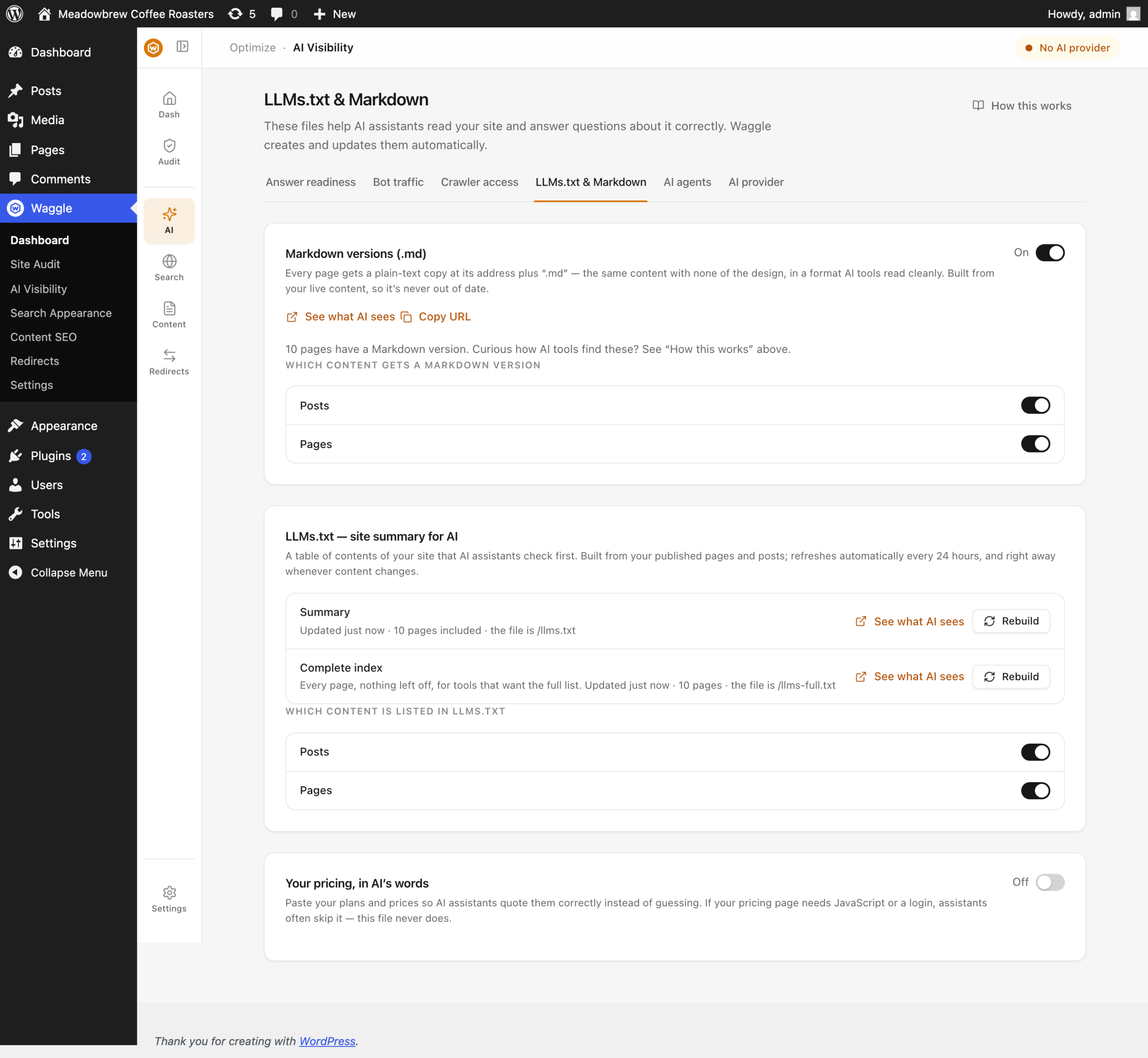
They all live on one screen, AI Visibility → LLMs.txt & Markdown, as four cards:
Markdown versions (.md), Site summary for AI (llms.txt), Complete site index for AI
(llms-full.txt) and Your pricing, in AI's words (pricing.md).
What is llms.txt, and should I use it?
/llms.txt is a plain-text index of your site: a title, a short description, and a list of
your important pages. /llms-full.txt is the same thing with the page limit removed.
Here is the honest position. llms.txt is good housekeeping, not a proven way to get
ranked or cited. No major AI company has promised to read it. Google's John Mueller
compared it to the old keywords meta tag, and added a point you can check yourself:
AFAIK none of the AI services have said they're using LLMs.TXT (and you can tell when
you look at your server logs that they don't even check for it).
Check it against your own data. AI Visibility → Bot traffic lists your most crawled URLs, and on
most sites llms.txt does not appear at all.
Waggle publishes it because it costs nothing, it is useful to any agent you point at it,
and you are ready if the idea catches on. If a tool tells you llms.txt will get you cited,
be sceptical.
What are the .md copies of my pages?
Add .md to any page URL and you get clean Markdown. Same content, no navigation,
sidebars, scripts or styling:
curl -s https://example.com/about.md | head -5
You get front matter with the title, canonical URL and date, then the body. The same
content is served at the normal URL if a client asks for Accept: text/markdown.
This is useful for agents that fetch one page and want its text. It is not how bulk
crawlers find you. They follow your sitemap, which lists your normal HTML URLs on purpose.
See how AI bots find your Markdown pages.
Does Markdown expose members-only content?
No, from Waggle 1.0.5 onwards. The Markdown copy is built the same way the page is
displayed to a logged-out visitor. If a membership or paywall plugin hides a post's body,
the .md copy hides it too.
Before 1.0.5, Waggle built the Markdown straight from the stored post content, which
skipped those plugins. If you restrict content, update. See
restricted content showing in your .md pages.
Password-protected posts and drafts have never had a .md copy.
How do I stop a page publishing a .md version?
Three levels of control. Any one of them switching off is enough.
Site-wide. The master switch on AI Visibility → LLMs.txt & Markdown.
Per post type. The same screen has a toggle per type. Types you have set to noindex are
disabled here, because hiding a page from search engines and publishing a machine copy of
it are contradictory.
Per page. In the editor, open the Waggle panel → Visibility → Hide the Markdown
version. For several pages at once, use the posts list: it has a Markdown column and
two bulk actions, Hide Markdown version and Publish Markdown version.
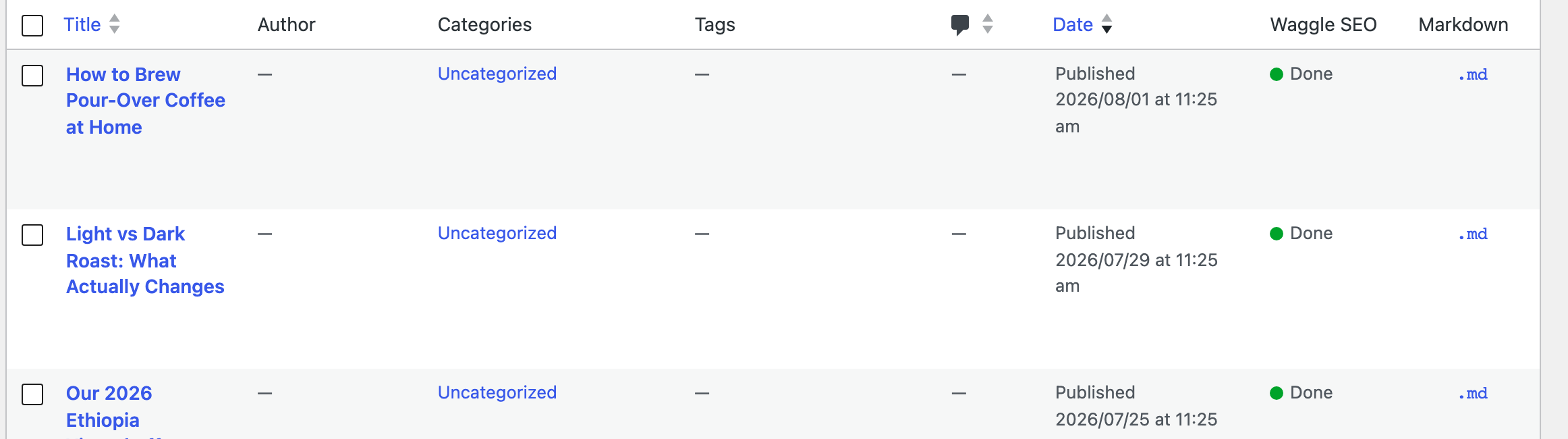
The Markdown column shows three states:
.md— a live link to the published Markdown copy- Hidden — you excluded it
- — — the post's own state prevents it, such as a draft or a password-protected post
That difference matters. "Hidden" is your decision, "—" is not.
What happens right after you hide a page?
The .md URL returns 404, Accept: text/markdown stops serving Markdown at the normal
URL, the <link rel="alternate"> tag disappears, and llms.txt regenerates.
One thing surprises people: the page does not leave llms.txt. It stays listed, but its
link changes from the .md URL to the normal page URL. The page is still part of your
content map. It just no longer offers a Markdown copy.
What is pricing.md for?
/pricing.md is an optional file describing your pricing, aimed at agents comparing
products for a buyer. Unlike your pricing page it has no JavaScript, no layout and no login
wall, so it is easy to parse.
It is off by default and only serves when it has content. On AI Visibility →
LLMs.txt & Markdown, switch on Your pricing, in AI's words, write the content, and save. Until both are true the
URL returns 404.
Keep it short and factual: plan names, prices, what is included, currency.
Why is an old file overriding Waggle's version?
If a real llms.txt or sitemap.xml file sits in your web root, your server hands that
file to visitors before WordPress runs. Waggle's version never gets a chance, and the file
stays frozen at whatever it said the day it was made.
Waggle warns you about this on the LLMs.txt & Markdown screen. You can confirm it yourself:
curl -sI https://example.com/llms.txt | grep -i "content-type|last-modified"
Waggle's version sends text/plain; charset=UTF-8 and no fixed last-modified. A static
file sends text/plain with no charset, plus a last-modified date and an ETag. The fix is
to delete the file over FTP or SSH. No plugin setting can override it. See
llms.txt shows the wrong URLs.
FAQ
Will Markdown copies cause duplicate content problems?
No. Every .md response sends X-Robots-Tag: noindex and a canonical link to the HTML
page, and .md URLs are kept out of your sitemap. If you see .md pages indexed, you are
on an older version. See
Google is indexing your .md pages.
Do AI crawlers actually read the .md copies?
Mostly not, and Waggle's bot log will show you the share. Crawlers follow sitemaps and send
ordinary Accept headers. The Markdown channel is for agents you point at a URL directly,
and for MCP clients.
Can an agent fetch a page's Markdown directly?
Yes. waggle/get-page-markdown returns it through the WordPress Abilities API, and it
respects every opt-out described above.
Related guides
- How AI bots find your Markdown pages
- The Waggle panel in the editor
- Why does my page have a .md version?