 PlugPress
Integrations: Tools From Your Other Plugins
Saddle isn’t limited to WordPress core. Plugins can offer their own tools through the same connection your AI already uses — so an assistant can update SEO metadata, check an email campaign, or write documentation with the plugin’s real features instead of improvising with generic post edits.
No extra keys, no separate setup, no second integration to configure. If the plugin is active and supports it, its tools appear.
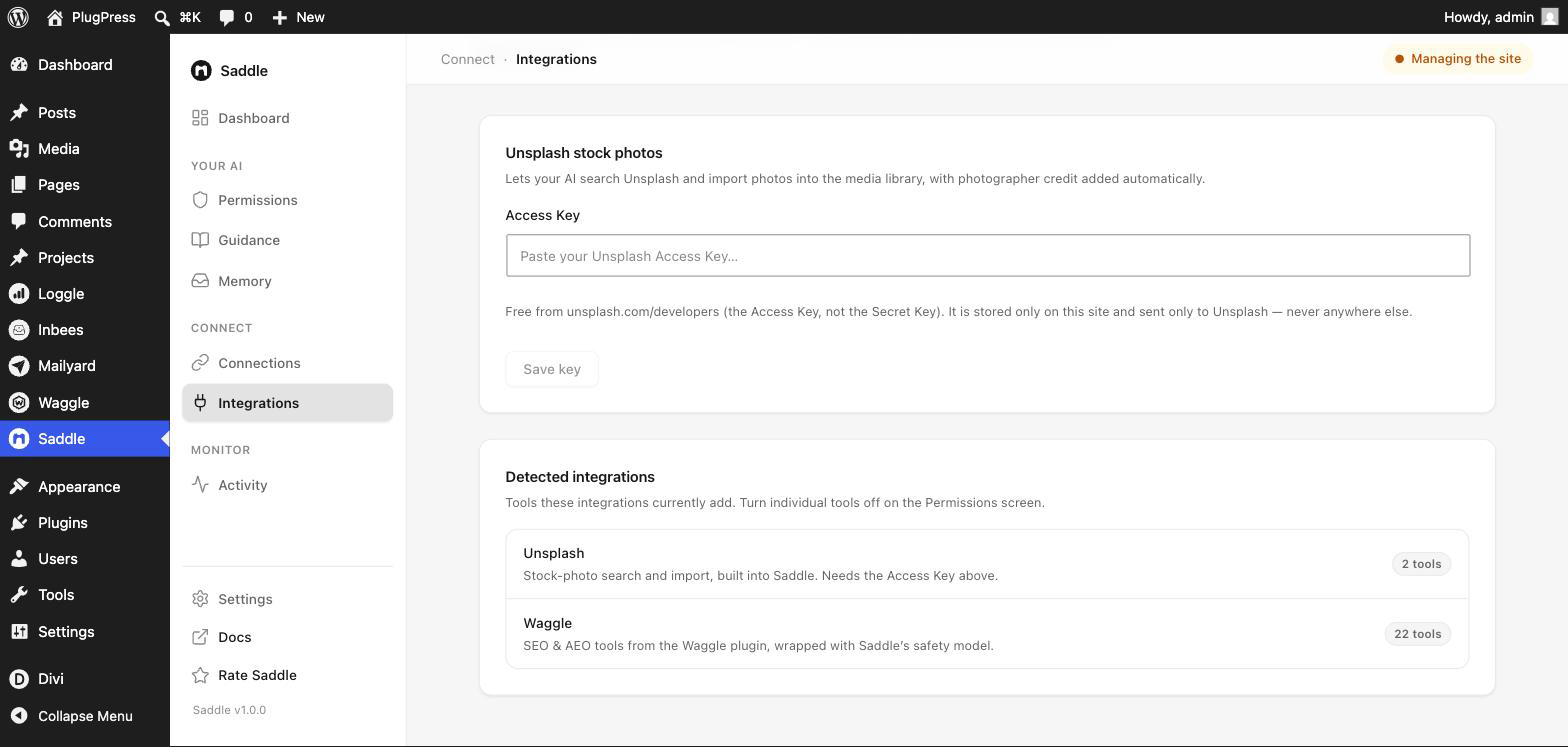
What’s on the Integrations screen?
Saddle → Integrations answers “what’s connected, and how much does it add”. It has two parts:
- Unsplash — built into Saddle, needs your own free Access Key. See Unsplash images.
- Detected integrations — partner plugins Saddle found active, with a count of the tools each contributes.
Nothing here needs configuring. Detection is automatic; the screen is for seeing what you’ve got. Individual tools are switched on and off on the Permissions screen, alongside everything else.
Which plugins connect?
| Plugin | What it adds | Needs |
|---|---|---|
| Waggle | SEO and AI-visibility tools — meta, readiness audits, redirects, 404s, citation checks | Free Saddle |
| Mailyard | Email tools — campaigns, contacts, deliverability, delivery logs | Free Saddle |
| Knovia | Documentation tools — create and organise knowledge-base docs | Saddle Pro |
Saddle’s own docs were written through the Knovia integration, which is a reasonable demonstration of the idea.
Do plugin tools follow the same rules?
Yes — that’s the whole design. A plugin’s tools aren’t passed through raw; Saddle wraps each one and applies its full safety model on top:
- Access levels. A plugin’s read tools work at Just reading; its write tools need Reading & writing.
- Per-tool switches. Every wrapped tool appears in Permissions with its own switch.
- The pause switch. Pausing AI access stops plugin tools too.
- The approval gate. Destructive plugin actions — deleting a redirect, removing a doc — preview and ask first, exactly like deleting a post.
- The activity log. One log for everything, not one per plugin.
So connecting a plugin doesn’t widen your risk surface in a way you have to reason about separately. It’s the same rules, applied to more tools.
Why route plugin features through one connection?
- One key, one audit trail. No per-plugin API keys scattered across services, and every action in one log.
- One permission model. You configure access once, not per integration.
- Better results. An assistant using a plugin’s real tool — “create a redirect”, “check deliverability” — does the job properly. The same assistant without it guesses, or edits raw post meta and hopes.
Assistants are also told which integrations are present at the start of each session, so they reach for the right tool instead of discovering it by accident.
For developers: connecting your own plugin
If your plugin registers abilities through the WordPress Abilities API, it can enrol its namespace with Saddle through the saddle_integrations filter. Saddle then wraps each ability as saddle/<slug>-<name> and applies tier enforcement, the pause switch, per-tool switches, the approval gate, and logging automatically.
The enrolment is inert if Saddle isn’t installed, so it’s safe to ship unconditionally.
FAQ
Do I need to connect anything?
No. Detection is automatic when the plugin is active — there’s nothing to link or authorise.
A plugin is active but I don’t see its tools.
Check the Permissions screen, which is the authoritative list of everything available on your site. If the tools are there, they’re working — the Integrations screen names the first-party integrations specifically. If they’re not there at all, the plugin doesn’t expose tools to Saddle.
Can I turn an integration off completely?
Switch its tools off on the Permissions screen, or deactivate the plugin.
Do integration tools cost anything extra?
No. If you own the plugin and it exposes tools, they come through your existing connection.