 PlugPress
The Activity Log: Seeing What Your AI Did
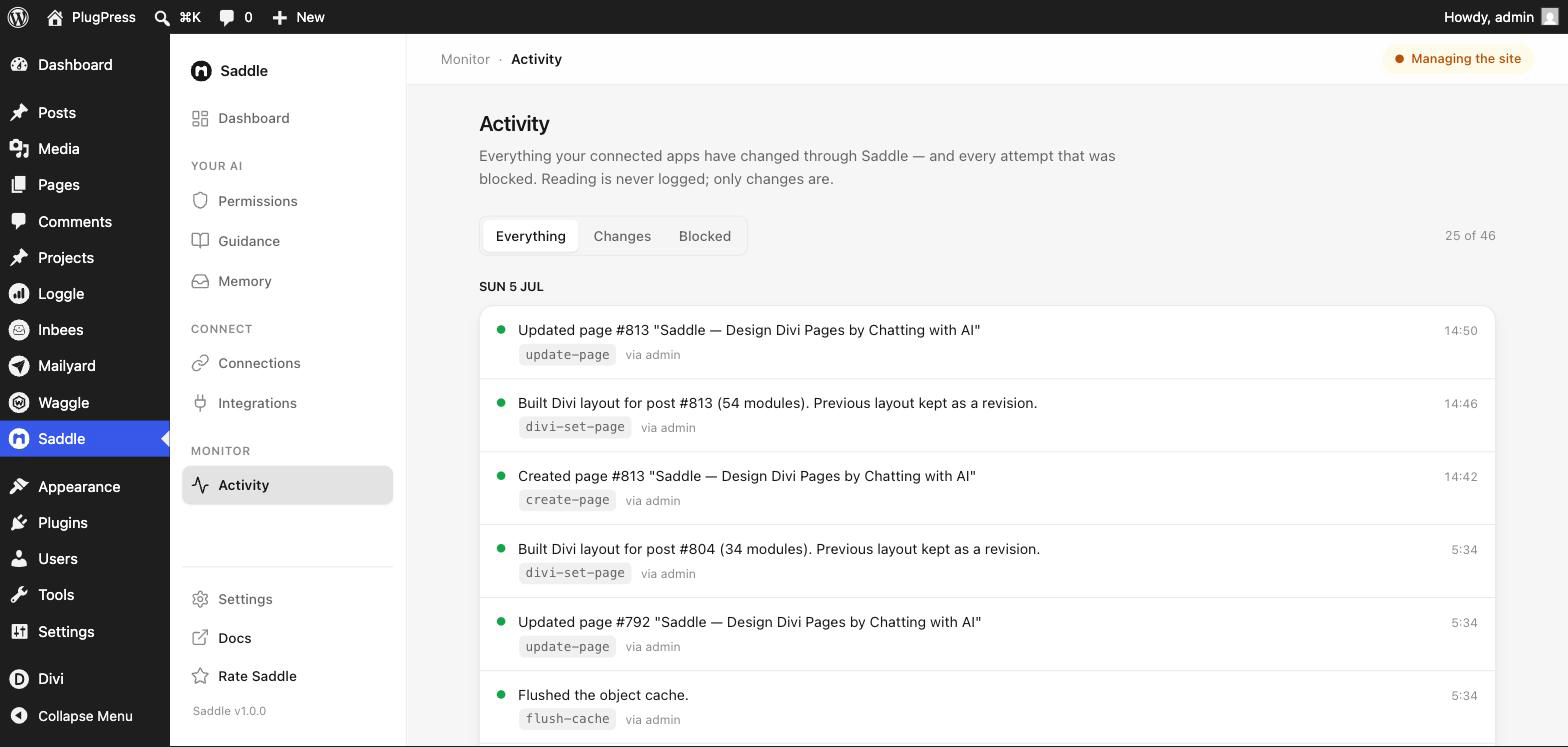
Letting an AI change your site is only reasonable if you can see what it changed. Saddle → Activity is that record: every modification made through Saddle, newest first, with the tool that did it and the account behind it.
What gets recorded?
Two things, and the distinction matters:
| Filter | What it shows |
|---|---|
| Changes | Modifications that actually happened — pages created, posts updated, media deleted, settings changed |
| Blocked | Attempts that were refused, because of your access level, a tool switch, or the pause switch |
| Everything | Both, interleaved in time order |
Reading is never logged. An assistant browsing your posts generates no entries at all — otherwise the log would be thousands of lines of noise and you’d never spot the one edit that mattered.
What’s in an entry?
Each line tells you what happened in plain language — “Updated page #813” — plus the exact tool that did it (update-page), which WordPress account it ran as, and the time. Entries are grouped by day.
The tool name is worth paying attention to. It’s the difference between an assistant editing a page’s text and rebuilding its entire layout, which read similarly in a summary but aren’t the same thing at all.
Why does the Blocked list matter?
Because it’s the interesting one. A blocked entry means an assistant tried something your settings didn’t allow. That’s not necessarily bad — it’s often just an AI probing what’s available — but a pattern is informative:
- Lots of blocks on one tool usually means your workflow needs something you’ve switched off. Either turn it on deliberately, or tell the assistant to stop trying via standing instructions.
- Blocks you can’t explain are worth reading carefully. This is where you’d notice an assistant attempting something you never asked for.
Most tools that log a refusal would simply have failed silently otherwise. Recording them is the point.
Can the AI read its own log?
Yes, and that’s deliberately useful. A connected assistant can look up what changed recently, so a fresh session knows what happened on the site before it starts making its own changes — instead of re-doing work or contradicting an edit from an hour ago.
It’s a read-only view for the assistant. Nothing can edit or delete log entries through Saddle, by design: a record an agent can rewrite isn’t a record.
What about deletions?
Every deletion appears here, and because destructive actions go through the approval gate, each one is a deliberate two-step event rather than something that happened in passing.
FAQ
How far back does it go?
The log keeps a rolling history — the Dashboard shows the running count. It’s a record of what your AI did, not a permanent audit archive; for compliance-grade retention, use a dedicated WordPress audit-log plugin alongside it.
Does it show which app made the change?
Entries record the WordPress account the call ran as. To tie activity to a specific app, give each connection its own key and name in Saddle → Connections.
Are changes I make by hand in wp-admin logged?
No. This log is only for changes made through Saddle by connected AI apps.
Can I turn logging off?
No. It’s part of the safety model, not a feature with a switch.
Where do I see it at a glance?
The Saddle Dashboard shows the total count and the most recent entries, with a link to the full log.