 PlugPress
Your AI Readiness Score Explained: How the Waggle Dashboard Works
Waggle's readiness score is a single number out of 100 that rates how ready your whole
site is to be found, read and cited — by search engines and AI answer engines alike. It
is produced by ten checks with fixed point values that sum to exactly 100. No AI runs to
calculate it, every point has a stated reason, and the same inputs always give the same
score.
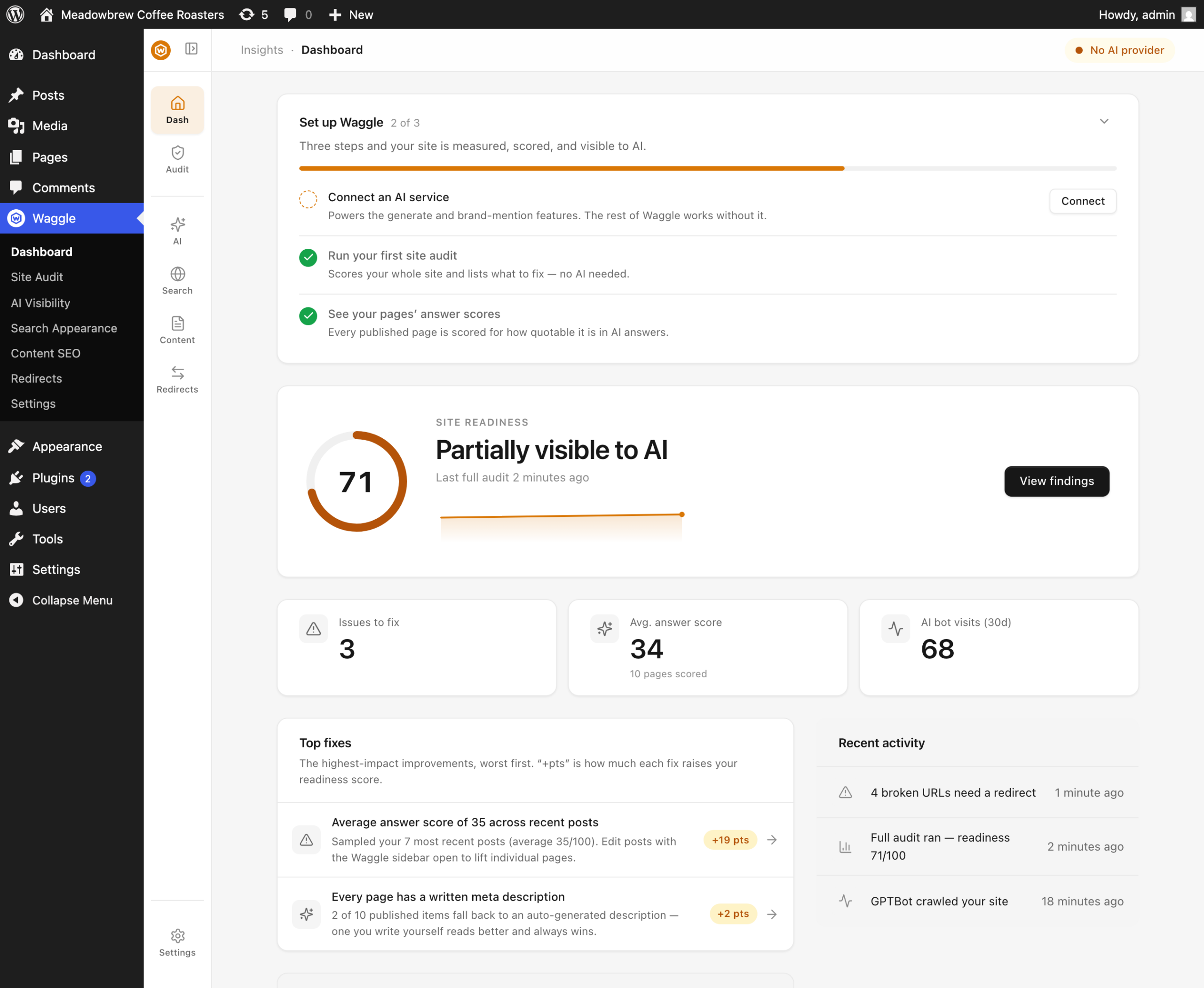
The Dashboard puts that score in the centre and everything else in service of it: what
changed, what's costing you the most points, and which single page is dragging hardest.
What do the ten checks measure?
The checks are grouped into four questions, each answering something different about how
legible your site is.
| Group | The question it answers | Checks |
|---|---|---|
| Reachable | Can engines get in at all? | HTTPS, search-engine visibility, AI crawler access |
| Understood | Can they read the meaning? | Meta coverage, noindex on published posts, llms.txt |
| Structured | Can they parse the shape? | XML sitemap, schema |
| Content quality | Is the content worth citing? | Average answer score |
And the weights, which are worth knowing because they tell you where effort pays:
| Check | Points | Group |
|---|---|---|
| Average answer score | 30 | Content |
| AI crawler access | 12 | Reachable |
| Visible to search engines | 10 | Reachable |
| Meta coverage | 10 | Understood |
| Served over HTTPS | 8 | Reachable |
| No noindex on published posts | 8 | Understood |
| XML sitemap | 8 | Structured |
| Schema markup | 8 | Structured |
| llms.txt served | 6 | Understood |
| Broken-URL pressure | 0 | Reachable (informational) |
Two things stand out. Content quality is worth 30 points — nearly a third of the total
— because no amount of technical hygiene makes thin content citable. Waggle says as much
in the audit's own verdict copy when the score is low:
Gaps are keeping AI engines from quoting you with confidence. Start at the top of the
list.
And broken-URL pressure scores zero on purpose: 404s waste crawl budget and deserve
surfacing, but they shouldn't move a score that is otherwise about legibility.
Why is my score not moving after I fixed something?
The Dashboard caches its payload for 15 minutes so that loading wp-admin doesn't re-run a
full site audit every time. Press Run audit to recompute immediately.
If the score still hasn't moved, check whether the fix you made was in the group you
expected — raising a single page's answer score barely moves the site-wide average
answer score if you have hundreds of pages.
How do I use the Top fixes list?
Top fixes is the part of the Dashboard to act on. It lists up to five non-passing checks,
ranked by how many points you'd recover, each with a +N pts badge.
Clicking a row takes you where the fix lives. Some open a settings screen inside Waggle;
some open a WordPress screen in a new tab — the "Visible to search engines" fix, for
instance, opens Settings → Reading, because that checkbox is WordPress's, not
Waggle's.
Work top-down. The ranking already accounts for the weights above, so the first row is
always the best use of your time.
What is the weakest page callout?
When your score is below 80, the Dashboard highlights the single published page with the
lowest answer score and links straight to it in the editor. It is the highest-leverage
piece of content work available, chosen for you.
This is a different score from the one at the top of the screen. The readiness score
rates your site; the answer score (the industry calls this AEO) rates one page. They
use different rubrics —
see how Waggle scores content for AI answer engines for the
nine-component page-level rubric.
What do the four stat tiles show?
- Average answer score — the mean per-page answer score across your published content, with the
number of pages measured underneath. This is the input to that 30-point check. - Issues to fix — how many of the ten checks are not currently passing.
- AI bot visits — crawler traffic in the recent window, from the bot log.
- Brand mentions — the result of your most recent mention check, if you run them.
What does the sparkline mean?
Once you have run the audit at least twice, a small trend line appears beside the score
showing your readiness history. It is the fastest way to see whether a month of work
actually moved anything.
Is the audit safe to run on any site?
Yes. The audit is entirely local and never calls an AI provider, so it costs nothing
and works on a site with no API key configured. It reads your settings, your rewrite
rules, your published content and your bot log, then applies fixed thresholds.
FAQ
What is a good readiness score?
Above 80 means nothing structural is broken and your remaining gains are in content. Below
60 usually means something categorical is wrong — most often the "Discourage search
engines" checkbox, which alone costs 10 points and makes several other checks pointless.
See nothing on your site is getting indexed or cited.
Why can't I reach 100?
You can, but the last 30 points require a genuinely high average answer score across your
published pages, which is content work rather than settings work. Most sites plateau in
the 80s until they start improving individual pages.
How often does the audit run on its own?
Weekly by default. Change the cadence under Settings → Notifications, where you can
also turn on a digest email summarising the audit, bot traffic, brand mentions and 404s.
Does the readiness score affect my Google ranking?
No. It is Waggle's own diagnostic, not a signal any search engine sees. It measures
whether the things that do affect discovery — indexability, crawler access, structured
markup, content quality — are in place.
Why does the score include AI crawler access at 12 points?
Because a blocked crawler cannot cite you at all, no matter how good the page is. It is
weighted above HTTPS and sitemap for that reason: it is binary and total, per engine.
Key sources
- GEO: Generative Engine Optimization (Aggarwal et al., KDD 2024): https://arxiv.org/abs/2311.09735
- Ahrefs — organic rankings vs AI citations, 1.9M citations analysed: https://ahrefs.com/blog/search-rankings-ai-citations/